

Text-based questions allow you to collect any type of data that isn't known in advance, such as comments, suggestions, customer codes, or email addresses. By default, the number of characters allowed is 30.
1- Tab Type: #
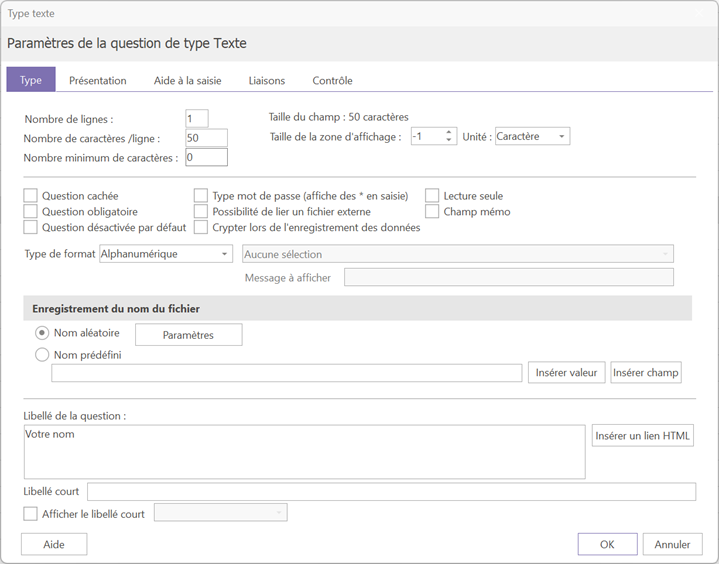
1.1- Characters and lines #
This tab allows you to configure the main settings of the text question, including the number of characters and lines allowed.
If you define a number of rows greater than 1, three additional fields appear. It is important to distinguish between the two areas:
- The fields on the left: define the total number of lines and characters allowed for input
- Additional fields: only concern the display of the question.
For example, if you have allowed 10 input lines but only want to display 5, this is the "« Number of lines »"additional fields that will need to be modified"
1.2- Other options #
- Required question: the respondent must complete this field to continue.
- Hidden question: the question will not be visible to the respondent.
- Type password: hides the on-screen input by replacing it with *.
Please note that the data remains visible in plain text within the data file. If you wish to also hide the input in the dataset, check the box "« Encrypt data during recording »
1.3- Input Format #
By default, the expected format is alphanumeric. However, it is possible to restrict the input to a specific format:
- Email addressThe response must follow the format of an email address (e.g.: address@domain.comThe question will not be validated until the format is respected.
- NIR code: for social security numbers
- License plate mask: for license plates
- Phone mask: for phone numbers
2- Data entry assistance #
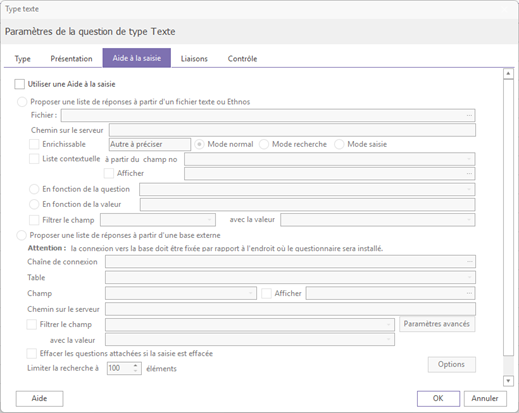
The answer guidance feature provides a list of suggested answers for a text question. This is particularly useful when the number of possible answers exceeds the limit allowed in Net Survey, or when this list is likely to change over time.
It also offers the possibility of automatically filtering suggestions based on the answer given to another text question which also has input assistance.
For example :
- The first question concerns the choice of a region
- The next question concerns the departments — depending on the selected region, only the corresponding departments will be offered.
2.1- Search methods #
Two main modes are available:
- Standard modeA drop-down list displays all available suggestions.
- Search modeThe respondent must enter at least three characters for the drop-down list to appear, showing only the items that match the entry.
To learn more about how the data entry assistance works, how to set it up and its specific features, see the dedicated article.
3- Connections #
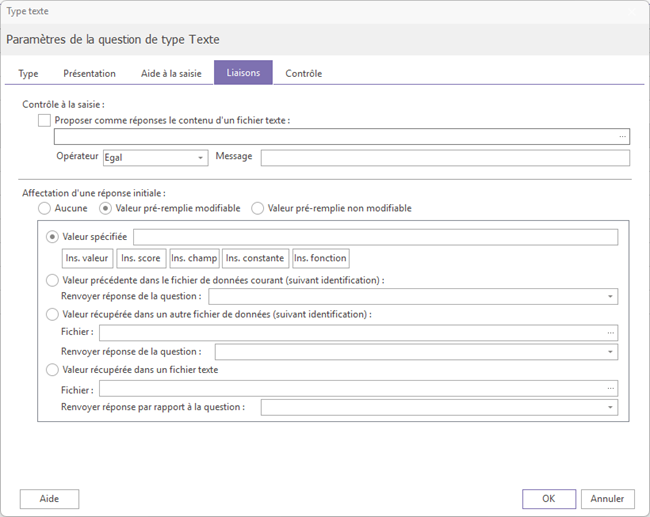
This tab allows you to automatically populate the current question using an existing value. Several sources are available:
- Value: repeats the answer given to a previous question in the questionnaire
- Score: retrieves the score obtained on a previous question
- Field: retrieves an element from the database of correspondents
- Constant: inserts a constant defined in Net Survey
- Function: applies a calculation or word processing function (see details below)
- External file: retrieves a value from a file in Ethnos (.g01) or TXT format. This file must be deployed on the server in the same folder as the questionnaire.
- Free text valueIt is also possible to directly enter a fixed text value in the linking field.
3.1 - Available Functions #
Four functions are available via Ins. Function:
- GenUID: generates a unique 20-character identifier.
Useful when credentials are not known in advance, while still retaining the benefits of authenticated access. (anti-duplicate, ability to resume an interrupted investigation)
- Stxt(Vn;d;p): returns p characters from the text of the answer to question n, starting from character d.
Example : if question 21 was answered with "home", then Stxt(V21;3;2) returns "is" (2 characters from the 3rd)
- Right(Vn;p): returns the first p characters of the answer to question n, starting from the right
- Left(Vn;p): returns the first p characters of the answer to question n, starting from the left
