

Time-type questions allow you to store a time (from 00:00:00 to 23:59:59) or a duration expressed in hours, minutes and seconds.
1- Type Tab #
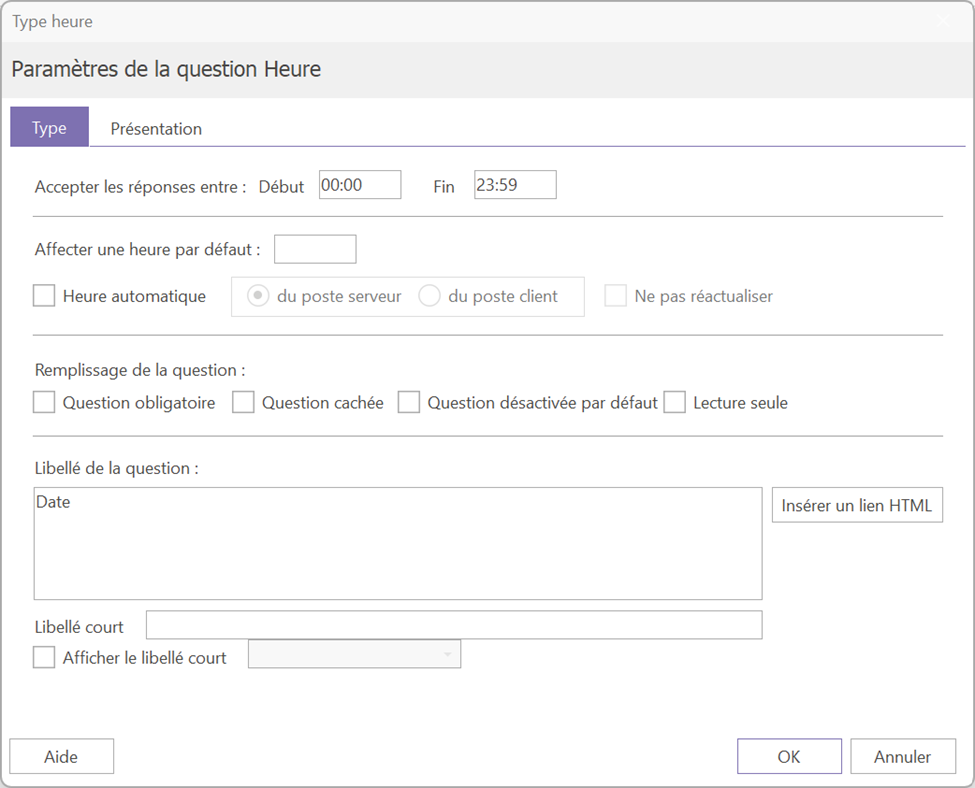
1.1-Main Parameters #
From this tab, you can configure the question's time limits. By default, answers are between 00:00 and 23:59.
1.2- Automatic time #
It is possible to automatically fill in the question with the current time by checking the box "« Automatic time »In this case, it is recommended to prioritize server-side pop-up rather than client-side pop-up, as the time can vary.
Attention : when the "Automatic time" box is checked, the question is automatically hidden for the respondent.
By activating automatic time setting, you can also choose to do not update the time Each time the page is visited, the time will be entered once and then stored as is.
If you want to display the current time while allowing the respondent to change it, enter the following formula in the "« Assign a default time » : [TIME()]
The time will be displayed by default and will remain editable by the respondent.
#
2-Use case: measuring the duration of a questionnaire #
Time-based questions are commonly used to measure the completion time of a questionnaire. Here's how to set up this tracking:
- A question about time on the front page: automatically filled in when the questionnaire is opened.
- A question about the time on the last page: automatically filled in upon validation by the respondent (note that if the page is not validated, the time will not be recorded).
- A calculated question: to obtain the time between the two hours.
If the two Time questions correspond to questions #3 and #45, the following formula will give the duration in seconds: √45 – √3
(Divide by 60 to get a result in minutes)
For the questionnaires started before midnight and finished after, Use the following formula which takes into account the change of day: SI(V45>V3; (V45-V3)/60; (V45+3600-V3)/60).
