

The calculated question is the result of a calculation formula that will return a numeric or empty value.
The calculated variables are primarily used:
- To show the respondent a result calculated from their answers (score, grade obtained, loan conditions, etc.).
- To summarize a complex condition of navigation in the questionnaire (page breaks, conditional display of page, hiding of area or inter-question control) with a simple value of 0 or 1.
- To implement customized consistency checks.
- To store in the data file a result that we do not want to have to recalculate during the analysis.
1- Operating principle #
1.1- Behavior of calculated questions #
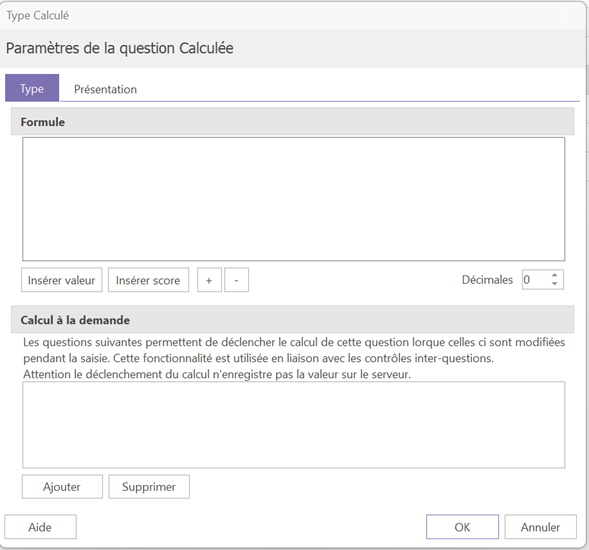
The formula for a calculated question is defined in the block Formula of its properties.
By default:
- She is masked for the respondent.
- Its result is calculated automatically at each page change, regardless of where the question is located in the questionnaire.
1.2- Displaying the result in the questionnaire #
To display the question, you will need to go to the tab presentation properties of the question, then check the box see in the form.
By default, the result is displayed as an integer.
If the result of your calculation may contain decimals, you can define the number of digits after the decimal point directly below the block Formula in the properties of the question.
1.3- Display the result on the same page #
If you want the result to be calculated on the same page as the questions that make it up, two conditions are necessary:
- Place the calculated question on this same page.
- Add the questions used in the formula, in the block Calculation on demand properties of the calculated question.
Thus, as soon as a respondent modifies one of these questions, the result updates automatically, without waiting for the page to change.
2- The elements that can be used in a formula #
2.1- The value of a question #
The reference Vn corresponds to the value of a question where n is the question number.
Ex : V2 is the value from question 2.
The value of the question will have a different meaning depending on the type of question:
- Numerical or calculated: Vn corresponds to the numerical value.
- Qualitative single-choice options : Vn is the order number of the chosen answer.
- Qualitative multiple-choice: Vn is the number of responses.
- Date: Vn corresponds to the conversion of a Date into the number of days between that date and 01/01/1900.
- Hour: Vn corresponds to the value in seconds of one hour.
- Text: Vn is not usable.
2.2 - The score of a question #
The reference Sn corresponds to the score obtained by question n where n is the question number.
The score for this question corresponds to the sum of the scores associated with each answer checked for question n.
This score will be 0 if no answer is checked, or if the checked answers have no scores.
2.3- The operators: #
2.3.1- Mathematics #
- Addition (+)
- Subtraction (-)
- Multiplication (*)
- Division (/)
As a reminder Multiplication and division take precedence over addition and subtraction.
2.3.2- By comparison #
- Strict superior (>)
- Greater than or equal to (>=)
- Strictly inferior (<)
- Less than or equal to (<=)
- Equal (=)
3- Logical functions #
3.1- SI #
Allows you to condition a calculation. The condition will be formed by an operation or by other logical functions.
Syntax : IF(condition; value_if_true; value_if_false)
Example : IF(V2>0 ; V1/V2 ; NR).
If the answer to question 2 is strictly greater than 0, the result of the calculated question will be V1/V2. Conversely, if the answer is less than or equal to 0, the calculated question will take the value NR, i.e., not answered.
3.2- AND #
Each condition must be met for the AND() function to be "true".
Example : IF(AND(V2<0;V2>0);V1/V2;NR)
Divides V1 by V2 only if V2 is not zero, otherwise returns a non-response (NR).
3.3- Or #
The OR() function itself only needs to be "true" if at least one condition is met.
Example : IF(OR(V2<0;V2>0);NR;V1/V2)
Divides V1 by V2 only if V2 is not zero, otherwise returns a non-response (NR).
3.4- NR #
NR is an action that returns the unanswered value to the calculated question, so we get an empty value.
This is useful for avoiding errors such as division by zero.
Example : IF(V2=0;NR;V1/V2)
3.5- No #
NO is used to reverse a condition.
Example : IF(NOT(V2=0);V1/V2;NR)
Divides V1 by V2 only if V2 is not zero, otherwise returns a non-response (NR).
3.6- Answered #
3.6.1- ANSWERED(n) #
The logical function ANSWERED(n) is used to check if the question number n is answered.
Example : ANSWERED(1)
If question 1 is answered, the calculation will take the value 1, otherwise it will take the value 0.
3.6.2- ANSWERED(Vn,x) #
The logical function ANSWERED(Vn,x) is used to check if a question option has been answered. With n which corresponds to the question number and, x to the modality.
Example : IF(OR(ANSWERED(V1,1);ANSWERED(V2,1));1;0)
The calculation returns 1 if the first option is selected in both questions.
3.6.3- RESPONDUREP(Vn,x) #
The logical function REPANDREP(Vn,x) is used to check if multiple options of a question have been answered. With n which corresponds to the question number and, x to the modality.
Example : RESPONSEP(V1,1) + RESPONSEP(V1,2) + RESPONSEP(V1,3)
The calculation will examine the options in question 1 and will return:
- 3 if all three options have been checked.
- 2 if two of the options have been checked.
- 1 if only one of the options has been checked.
- 0 if none of the options have been checked.
