

Date-type questions allow for the collection of dates between a start and end range. These ranges define the interval within which the respondent must enter their date.
1- Type Tab #
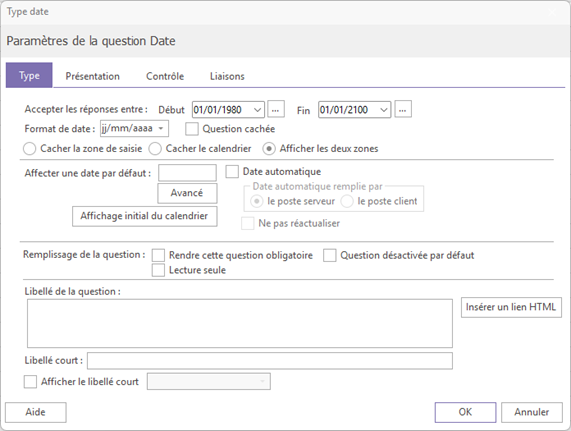
1.1- Main parameters #
From this tab, you can configure the following elements:
- The terminals: Define the allowed start date and end date
- The date formatSeveral formats are available: year only, month only, month and year, or Anglo-Saxon format.
- The display By default, two areas are displayed in the questionnaire: an input field and a calendar icon for selecting a date directly. You can choose to display both areas or just one.
1.2 - Automatic Date #
It is possible to automatically fill in the question with today's date by checking the box. «"Automatic date". In this case, it is recommended to prioritize filling by the server rather than by the client workstation, whose date may vary.
Attention : When the "Automatic Date" box is checked, the question is automatically hidden for the respondent.
By enabling automatic date, you can also choose not to update the date Each time the page is accessed, the date will be entered once and then saved as is. This can be useful, for example, to record the start date of a questionnaire and then calculate the response time.
If you want to display today's date while allowing the respondent to change it, enter the following formula in the block «"Assign a default date"» : [TODAY()]
Today's date will be displayed by default and will remain editable by the respondent.
#
2- Control Tab #
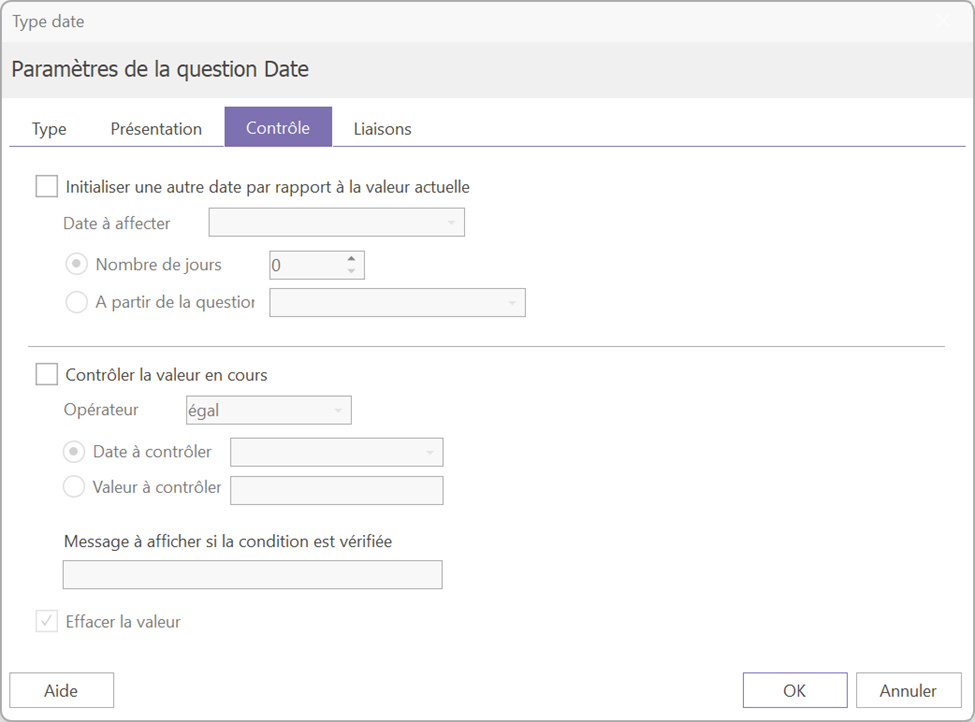
This tab allows you to set a date based on another date in the questionnaire.
Two types of control are available:
- Initialization with a day's delay: starting from an existing date in the questionnaire, define a new date by adding a number of days to it.
This can, for example, be used to impose a response deadline calculated from the start date of the questionnaire.
- Consistency check: checks that the date entered in the current question complies with a defined condition: greater than, less than or equal to a date entered in a previous question.
For example, if a first question asks for the date of a first appointment and a second for the date of a second appointment, you can ensure that the second date is much later than the first.
