

• contact@soft-concept.com
  • + 33 (0)4 78 54 64 00
  • Login to EthnoForms
Soft Concept Soft Concept
  • Solution

    Discover our business solutions

    See our use cases
    Customer Satisfaction

    Stop the irritants, analyze the verbatim comments and improve the customer experience.

    Employee Experience

    Measure engagement, detect weak signals and manage your social climate.

    Product Panel & Testing

    Test your assumptions against real-world usage and secure your innovation decisions.

    Mobile Collection

    Collect reliable data from the field, in real time, and automate your workflows.

    Our software suite
    Discover all our software
    Logo EthnoForms, logiciel d’enquêtes 100% SaaS.
    SaaS Surveys and Analysis
    Logo Ethnos Suite, suite logicielle desktop d’analyse d’enquêtes.
    Desktop Surveys and Analysis
    Logo Panel Manager, solution de gestion de panel pour les études.
    Panel Manager
    • To be accompanied
    • Training
    • Support and Assistance
    • Custom application development
    • Ethnos Campus
  • Needs
    • Teams
    • For research officers
    • For HR
    • For product and R&D managers
    • For the listeners
    • Sectors
    • Distribution
    • Health
    • Transportation
    • Landlords
    • Tourism
    • Construction and Public Works
    • Industry
    • Banking & Insurance
    • Telecom
    • Public service
    • Education
    • To be accompanied
    • Training
    • Support and Assistance
    • Custom application development
    • See all our use cases
  • AI
  • Resources
    About

    Discover our mission, our values and the expertise that drives us every day.

    Survey-Magazine

    Magazine dedicated to the world of marketing studies and research.

    Webinars

    Access replays of our webinars and delve deeper into the topics that interest you.

    White papers

    Download our practical guides and exclusive resources to learn more.

    News

    Discover all our news: new products, events and trends.

    What's New & Updated

    Stay informed about the latest software developments, features and news.

    Maintenance service

    Access essential support and information for your tools.

    HelpDesk

    Consult the documentation and user guides for our software.

Contact us
Free trial
Soft Concept Soft Concept
  • Solutions
    • Our business solutions
      • Customer Satisfaction
      • Employee Experience
      • Product Panel & Testing
      • Mobile Collection
    • Our software suite
      • SaaS Surveys and Analysis
      • Desktop Surveys and Analysis
      • Panel Manager
    • To be accompanied
      • Training
      • Support and Assistance
      • Custom application development
      • Ethnos Campus
  • Needs
    • Teams
      • For research officers
      • For HR
      • For product and R&D managers
      • For the listeners
    • Sectors
      • Distribution
      • Health
      • Transportation
      • Landlords
      • Tourism
      • Construction and Public Works
      • Industry
      • Banking and Insurance
      • Telecom
      • Public service
      • Education
  • Artificial intelligence
  • Resources
    • About
    • Survey-Magazine
    • Webinars
    • White papers
    • Maintenance service
  • Contact us
  • Free trial
Soft Concept > Documentation > Net Survey > Questions Time

Net Survey

  • Questions Time
  • Date questions
  • Text questions
  • Qualitative questions
  • Calculated questions

EthnoForms

  • Use of AI in the analysis of ethnoforms

Survey Manager

  • Email solicitation
View Categories
  • Home
  • Documentation
  • Net Survey
  • Questions Time

Questions Time

2-minute read

Time-type questions allow you to store a time (from 00:00:00 to 23:59:59) or a duration expressed in hours, minutes and seconds.

1- Type Tab #
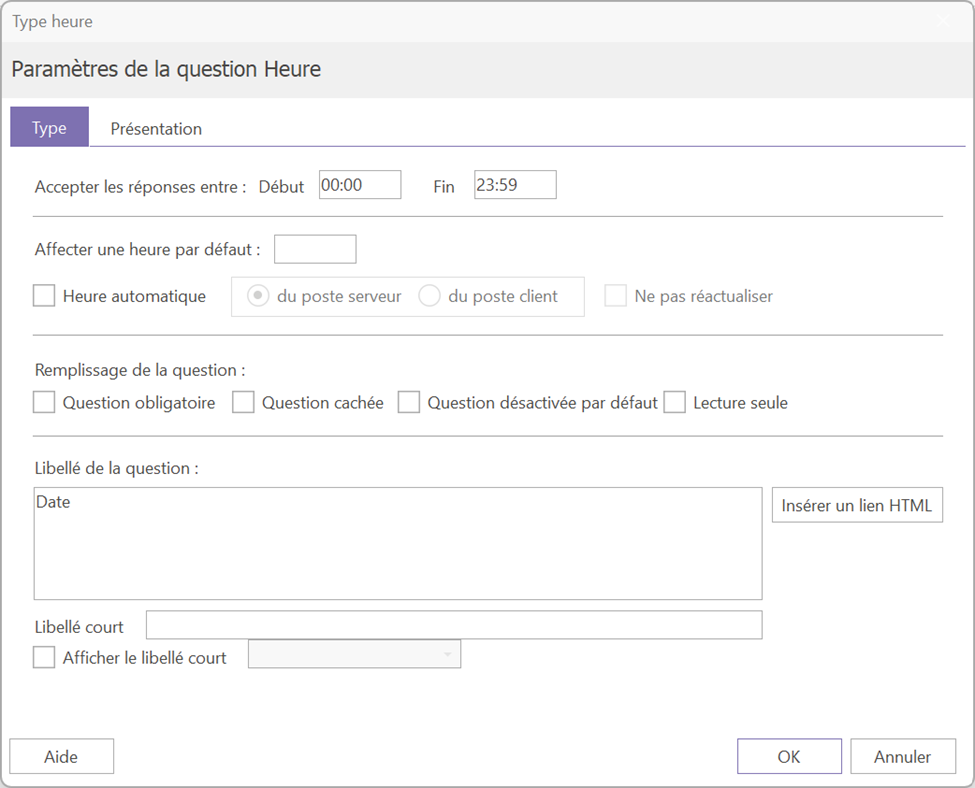
1.1-Main Parameters #

From this tab, you can configure the question's time limits. By default, answers are between 00:00 and 23:59.

1.2- Automatic time #

It is possible to automatically fill in the question with the current time by checking the box "« Automatic time »In this case, it is recommended to prioritize server-side pop-up rather than client-side pop-up, as the time can vary.


Attention : when the "Automatic time" box is checked, the question is automatically hidden for the respondent.


By activating automatic time setting, you can also choose to do not update the time Each time the page is visited, the time will be entered once and then stored as is.

If you want to display the current time while allowing the respondent to change it, enter the following formula in the "« Assign a default time » : [TIME()]

The time will be displayed by default and will remain editable by the respondent.

#

2-Use case: measuring the duration of a questionnaire #

Time-based questions are commonly used to measure the completion time of a questionnaire. Here's how to set up this tracking:

  • A question about time on the front page: automatically filled in when the questionnaire is opened.
  • A question about the time on the last page: automatically filled in upon validation by the respondent (note that if the page is not validated, the time will not be recorded).
  • A calculated question: to obtain the time between the two hours.

If the two Time questions correspond to questions #3 and #45, the following formula will give the duration in seconds: √45 – √3

(Divide by 60 to get a result in minutes)


For the questionnaires started before midnight and finished after, Use the following formula which takes into account the change of day: SI(V45>V3; (V45-V3)/60; (V45+3600-V3)/60).

Updated on June 9, 2026
Calculated questionsDate questions
Table of Contents
  • 1- Type Tab
    • 1.1-Main Parameters
    • 1.2- Automatic time
    • 2-Cas d'usage : mesurer la durée d'un questionnaire
Image Image Dark

Collect data where it originates and transform it into high-impact decisions with Soft Concept solutions.

  • Solutions
  • Customer satisfaction
  • Employee experience
  • Product Panel & Testing
  • Mobile Collection
  • Needs
  • For research officers
  • For HR
  • For product and R&D managers
  • For the listeners
  • AI
  • Discover our AI module
  • Resources
  • About
  • Survey-Magazine
  • Webinars
  • White Papers
  • News
  • What's New & Updated
  • Maintenance service
  • HelpDesk

Soft Concept © 2026, All rights reserved.

Legal notice

General Terms and Conditions

English (UK)
Français